The project dashboard has been developed to help you transparently manage your operation within GXLab. There are a few key terms you’ll need to know about:
-
Subscribed projects. These are projects that count towards your subscription. You can use these projects for processing data, drawing or adding boundaries and sharing with clients.
-
Unsubscribed projects. These are projects that do not contribute to your subscription. An 'Unsubscribed' project will sit dormant against your subscription until marked 'Subscribed' again.
-
Invited projects. These are projects owned by someone else, that you have been invited to. You can still run processing on these projects, depending on whether or not the project is subscribed or unsubscribed.
- Favourite. These are projects selected as 'main or priority' projects that are used regularly. They will sit at the top of the dashboard project list.
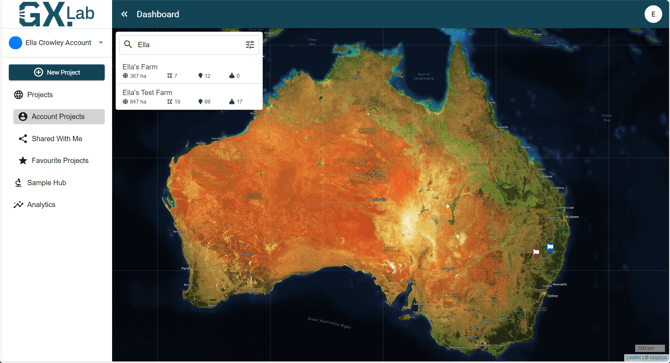
When you first sign in to your GXLab account you will be presented with a map of Australia and the view of your current project holdings.
On the left hand menu, users have the options to:
- Dropdown and select the account desired to utilise.
- Create a New Project that will site under the selected account.
- Access all Account Projects listed.
- Access Shared projects that users have been Invited too.
- Access Favourite Projects
- Navigate to the Sample Hub
- Navigate to Analytics
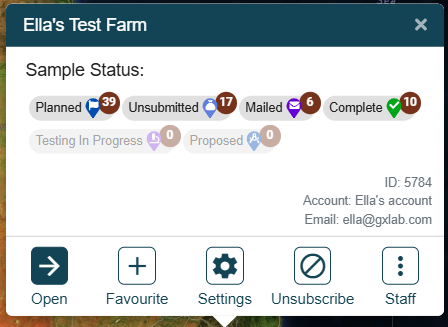
When a user clicks on the project name in the Account Project menu, a project status pop up will appear as shown below. This will give users a snapshot of the following:
- Sample Status. This previews the projects point status, informing on Complete, Planned, Unsubmitted, Mailed, Testing in Progress, and Proposed point status.
- Open. Option to continue on to the projects.
- Favourite. Detailed above.
- Settings. Users can navigate to Project Details where edits can be made, users can be added, and notes/documents can be stored.
- Unsubscribe and Subscribe project action enabled.